Issues and projects
For agents and engineers.
Internal work, kept apart from client conversations: bugs, tasks, feature requests. An issue has no client and no email thread.
Why it lives in the desk rather than in a tracker of its own: the link to tickets. Several reports of one fault gather on one issue, and when it is fixed they can all be answered in one action.
Projects
A project belongs to one brand and has a short key (CP, PNL) from which references are built, so
an issue reads CP-42. Keys are unique across the whole desk, because a reference has to mean one issue
wherever it is typed, including in a ticket’s search box.
Visibility is one of two things:
- Open to the brand: anyone who works that brand is a contributor.
- Members only: anyone not named on it gets nothing: not listed, not fetchable, not searchable, and never mentioned by a link from somewhere they can see.
Roles on a project: manager (runs it, its vocabulary, labels and people), contributor (opens, edits, moves and closes issues) and reader (reads and comments). Administrators are managers everywhere. All of it comes from one rule, so the board, the list, the API and the pickers cannot disagree.
A project with issues is archived, never deleted.
An issue
A reference and title, Markdown details, a status, a kind of work, a priority (the same words as ticket priorities), an assignee, a reporter, the project’s labels, a due date, comments, checklists, files, links, and a trail of everything that changed.
Statuses are fixed (Open, In progress, Blocked, Done) and mean the same in every project, so a reference means the same thing wherever it is read. Set it from the issue, the list, in bulk, or from a script.
Kinds of work are the project’s own vocabulary: Bug, Feature, Task, Chore by default, editable per project, shown as a coloured pill. Nothing in the desk branches on the kind, which is exactly why it can be yours, it is for reading, filtering and grouping.
Numbers are counted per project with a locked increment and never reused. An issue can only be assigned to somebody who can actually see the project.
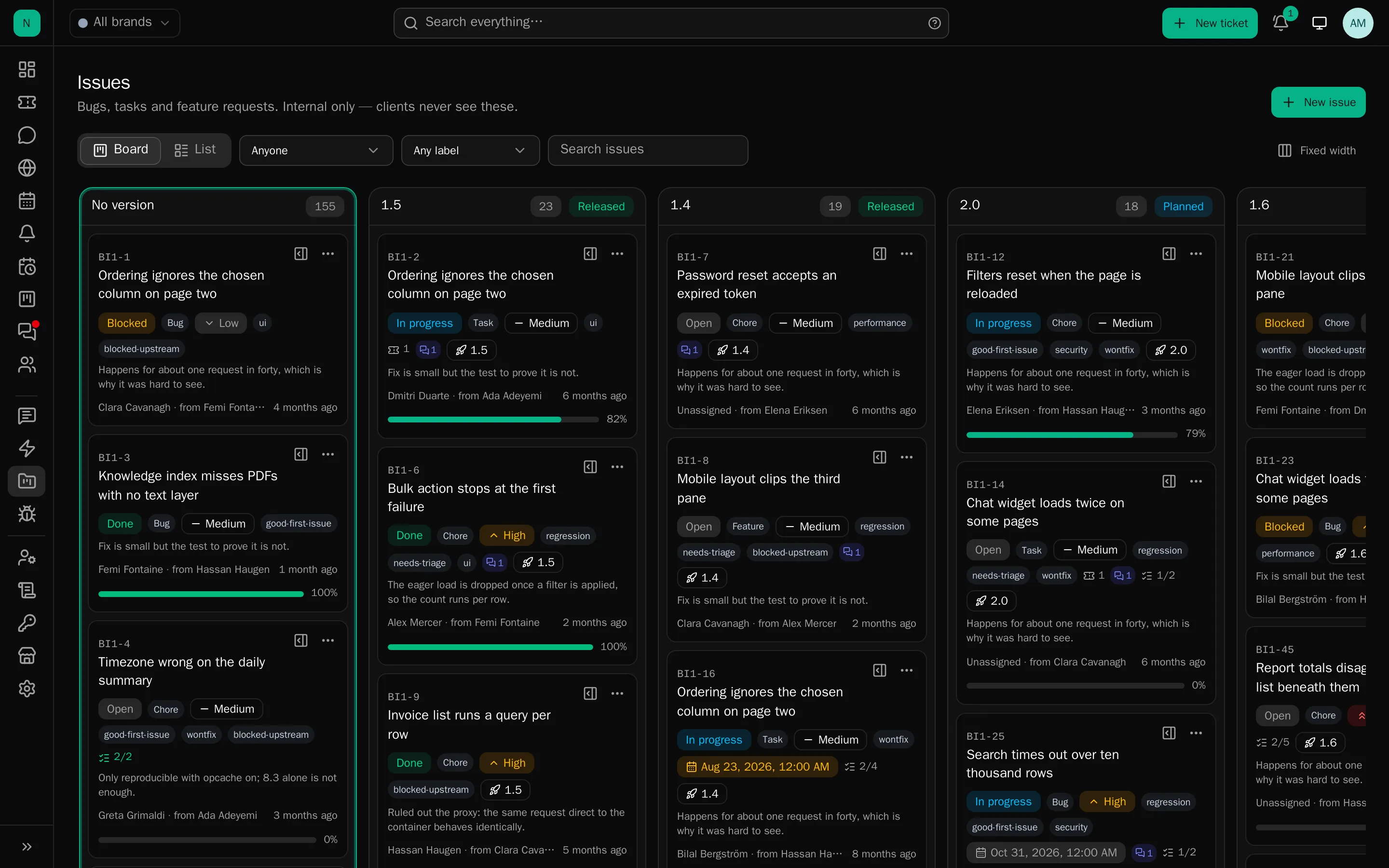
The board
The board is the plan: one column per version, newest first, with the unplanned pile at the front. Drag a card to plan it into a version, or use the menu on the card, which is the same action, so it works from the keyboard and with a screen reader.
Status is not the board. An issue’s status is set on the issue, in the list or in bulk, so that “what state is this in” and “which release is it going into” stay separate questions.
A board shows at most 400 cards and says so when there are more; the list is where a long history is read.
The list
For scanning a backlog: state (open, finished, everything), priority, assignee, kind, label, due (overdue, this week, none) and a search, sorted by reference, priority, due date, opened or updated, 25 a page. Filters live in the address, so a view can be shared. Mine, across every project is the same list narrowed to you, and it never reaches into a project you cannot see.
Working in an issue
Discussion: threaded one level deep, because that is what people actually use. A thread shows its reply count and folds; long ones open folded. You can edit your own comment (and only your own, a manager can remove one, never rewrite it), and the trail keeps the original wording.
Checklists: named lists, more than one per issue, because “Before merging” and “After release” are asked at different moments. Ticking records who ticked it. There is no percentage field: progress is counted from the items, so the “3/7” on the card, the figure in the header and the list itself cannot drift apart.
Files: on the issue or with a comment, checked and screened exactly as a ticket’s are, with images pasting and dropping inline.
Mentions: @Sam in the details or a comment tells Sam. Anyone who cannot see the project is passed
over in silence: a mention must never be the thing that reveals work exists.
Watchers: anyone who can see an issue can watch it, and nobody can be made to. The reporter and the assignee watch from the start; joining the discussion starts you watching. Watchers hear about comments, planning changes and the issue finishing or reopening, never about something they did themselves.
Links: issues relate to, block, or duplicate one another, and one can hang under another as a sub-issue. A related issue you are not allowed to see is not named at all.
Templates: per project: the questions you always end up asking about a bug, offered when an issue is opened. A template is a prompt, not a rule; anything already typed is left alone.
Everything edits in place. The title is a box that looks like a heading; the details render until you click them; the fields down the side save as they change.
Tickets and issues
From a ticket, a chip row beside the tags searches by reference or by words and links the issue; the ticket then shows the issue and its status. From an issue, every linked ticket with its status.
A link only ever joins records in the same brand: a ticket saying “being fixed in CP-42” would otherwise leak another brand’s work to whoever is reading it.
Answering everyone at once
When an issue is Done, “Reply to N linked tickets” shows exactly which conversations would be answered, which are already closed and so left alone, and which sit in departments you do not work in and will be skipped. Start from a canned response (rendered against the first ticket, so placeholders are filled) or write it there, with “close each ticket after replying”. Nothing is sent until you confirm.
Each reply goes through the same path a staff member’s own reply takes, so clients are emailed as usual and the ticket’s own rules run.
Elsewhere
Due dates appear on the calendar and in the personal iCal feed. Being given an issue, or a comment on one you reported, ring through the usual notification channels. Logs → Projects records projects made, changed, archived and removed, membership changes, and every time a fix was replied to all its linked tickets.
Issue lists, boards and open issues keep up live with work done anywhere else, another person’s screen, a rule, or a script holding an automation key.
Deliberately not included
Estimates, sprints, burndown and velocity, Gantt charts, reactions, deeper nesting, and syncing to GitHub, GitLab or Jira. This is a tracker for a support desk’s own work, not a replacement for a development tracker.