Visitor tracking
For whoever is running the desk.
The same snippet that draws the chat widget can record who is on your sites, whether or not they ever chat. It is its own feature with its own switch: chat can be off and tracking on, or the other way round.
What is recorded
Per browser (a session): the pages visited (the last 20), the page title, referrer, language, timezone, screen size and whether it is a touch device, the browser and operating system parsed from the user agent, the address, first and last seen, and how many chats came from that browser.
Optionally, where the address is: city, region, country, coordinates, the network operator and its ASN, through a location service you choose in Settings → Location services: off, a local MaxMind database, ipinfo.io with a token, or ip-api.com. Lookups are queued, cached for seven days, and private addresses are skipped.
Consent and Do Not Track
Per brand, three modes: with chat (the default, a session exists once the widget runs), always (tracking-only pages too), or off. Two more switches: require consent before recording anything, and honour the browser’s Do Not Track signal. With tracking off, a session keeps only the current page, browser and address, no trail, referrer, screen or location.
Retention is yours: sessions with no chat are removed after the number of days you set, and older ones that do have chats are scrubbed of their trail, address, location and browser.
The Visitors page
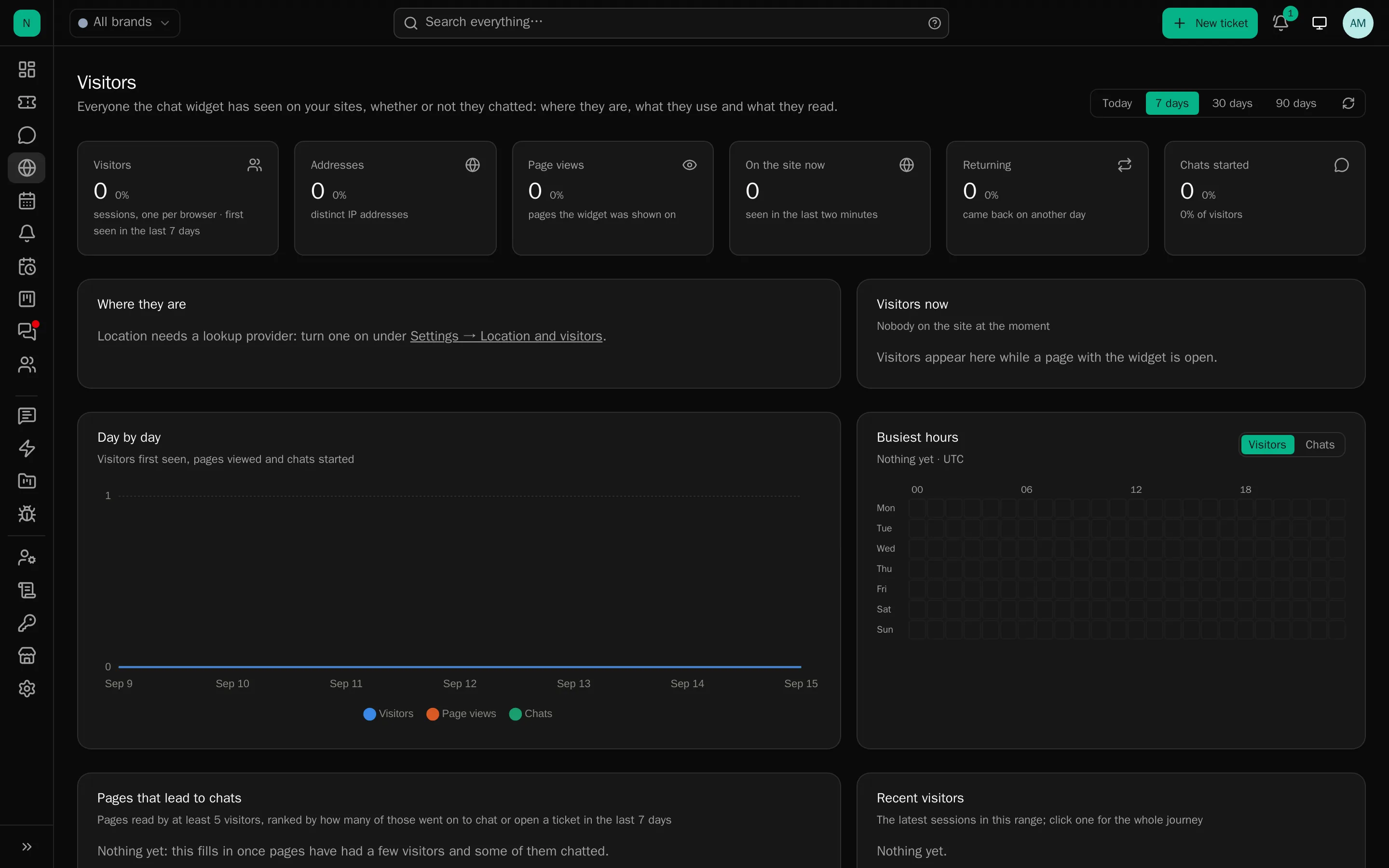
Totals (visitors, page views, on the site now, returning, chats started and the rate), a daily series, and a world map of where they are, drawn from real country outlines shipped with the app, so no tiles are fetched from anywhere.
Then the breakdowns, top ten each: countries, cities, pages, referrers, browsers, systems, devices, languages, and how many were signed in. Click any row to narrow the whole page; the choices become removable chips and live in the address, so a view can be shared.
Also on the page:
- Busiest hours: a 7×24 grid of visitors per hour, switchable to chats started.
- Pages that lead to chats: pages read by at least five visitors, ranked by the share who went on to chat or open a ticket. The most useful thing on the page.
- Campaigns:
utm_source,utm_mediumandutm_campaignfrom the pages people arrived on. - Comparison: every tile shows the change against the previous period of the same length.
- Recent visitors and Visitors now, which link into a journey.
Journeys
Click any visitor to open their journey: the visitor card, then their visits as a timeline of pages with time spent (a 30-minute gap starts a new visit), and the chats and tickets that came out of it. From there you can open the chat, say hi, or go to the client record.
Say hi
From Visitors now, pick somebody and start a conversation: the chat opens assigned to you with your line first, the widget opens on their side with the attention cues, and the ticket records that staff started it. Refused if you are unavailable, at your chat limit, or the visitor is blocked.
Leaving people out
Settings → Location and visitors:
- Leave out staff (on by default): any address the staff app has been used from in the last 24 hours is kept out of the figures. This is why you do not appear in the visitor list while testing.
- Addresses to leave out: your office ranges, as addresses or CIDR networks, v4 and v6.
Excluded sessions are still recorded and still appear in “Visitors now” (marked as left out), but stay out of every figure, breakdown, map and counter, with a note saying how many were excluded.
Cost
Everything is computed from the sessions the widget already creates, cached for a minute per brand and filter set, and sampled above 20,000 sessions with a note saying so. There is no third-party analytics service and nothing leaves your server.